
 First, take a breath — your child’s phone is not hacked
We know how unsettling it is to hear that your child’s number is “sending” strange texts to their friends. So let’s start by reassuring you: your child’s phone almost certainly hasn’t been hacked, and no stranger has taken over their number.  Nothing was broken into, and your child didn’t do anything wrong. What’s really happening is a mix-up with a phone-carrier feature, and it’s completely harmless. Read on and we’ll show you exactly what it is, how to confirm it for yourself, and how to make it stop.
Short version: If a friend received a garbled or scam-looking text that appears to come from your child’s number — often formatted like “[number] deposited a new message… Click here to listen” — this is almost always a mangled voicemail notification, not a hacked phone and not a stolen number. Below is how to recognize it, confirm it yourself, retest it, and make it stop.
What people are seeing
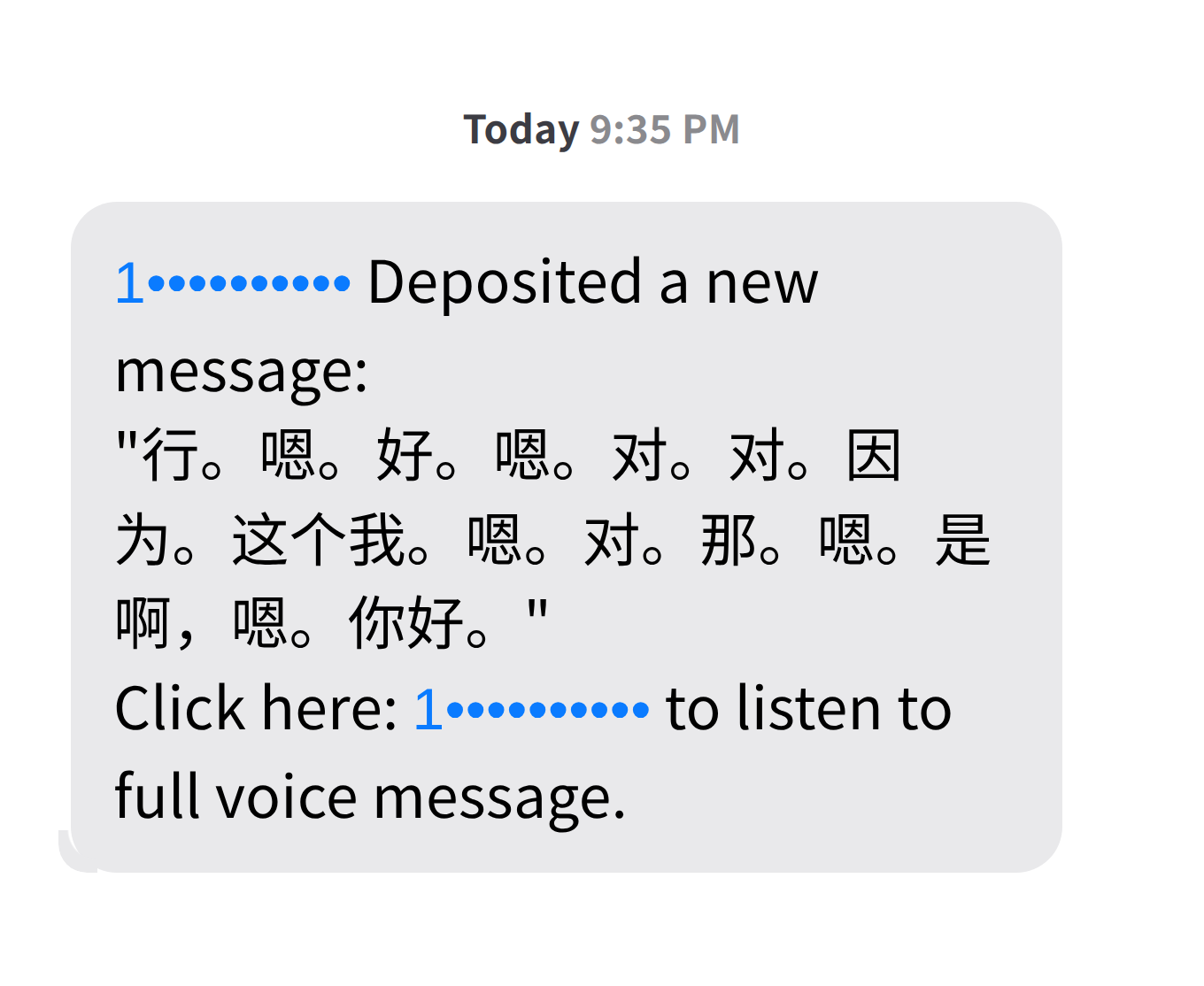
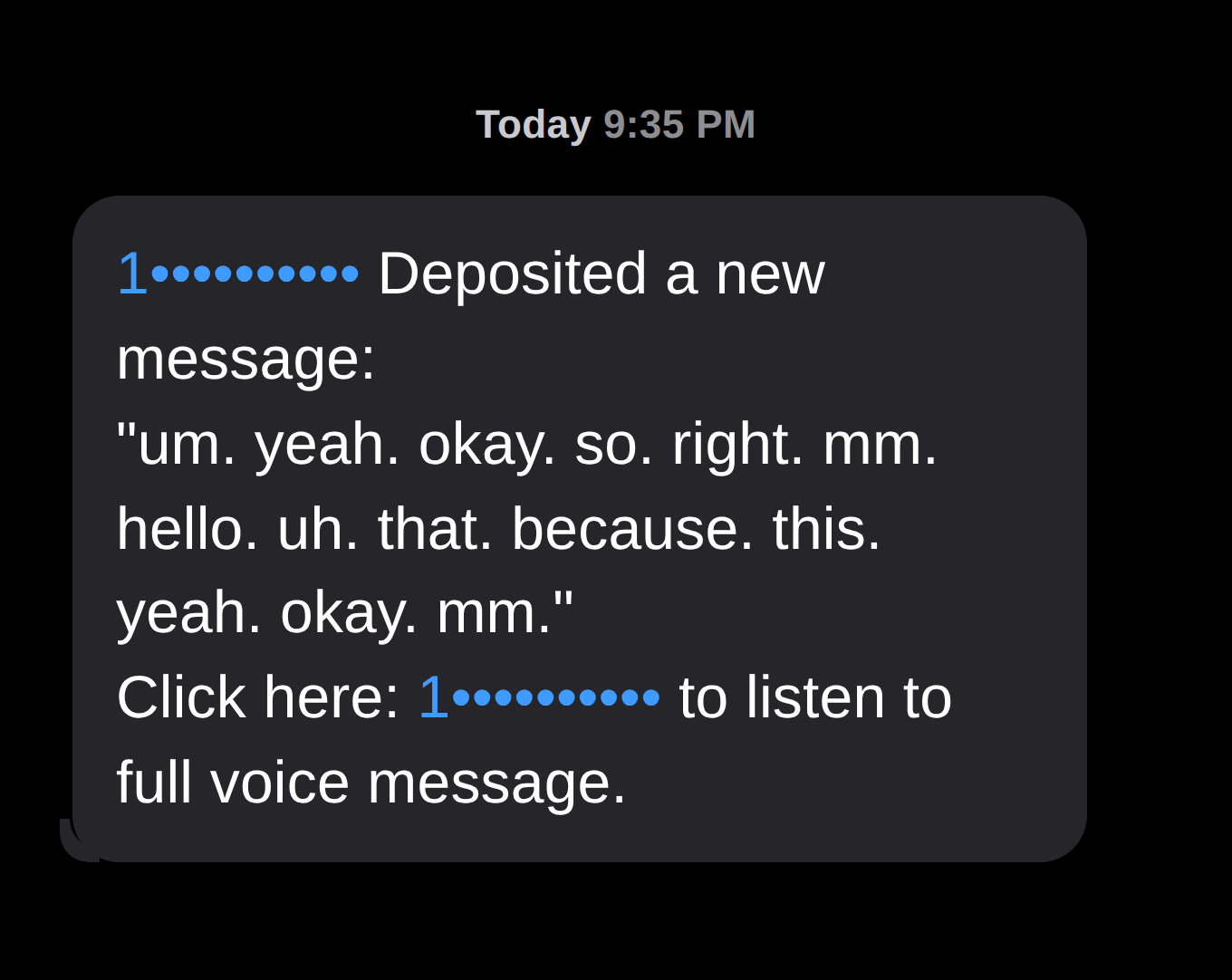
A friend (or the friend’s parent) gets a text that looks something like this:
1xxxxxxxxxx Deposited a new message:
“[a block of readable, garbled or nonsensical text]”
Click here: 1xxxxxxxxxx to listen to full voice message.
It looks alarming for three reasons: it seems to come from a child’s number, the body may read as gibberish — sometimes even in unexpected foreign characters — and it ends with a ‘click here to listen’ number that feels like a scam link.
The important thing to understand is that the body text can be literally anything. It’s an automatic, best-guess transcription of an audio clip, so depending on what the microphone picked up it might come out as broken English, random disconnected words, repeated filler sounds, or even a completely different language than anyone was actually speaking. In one real example we reviewed, the text rendered as Chinese characters that translated to nothing but conversational filler — “Okay. Mm. Yeah. Yeah… Hello.” — the little back-and-forth noises a person makes during a live call. But the specific words, and even the language, are not meaningful. Whatever the content, it’s the fingerprint of a voicemail being auto-transcribed, not a message anyone typed and sent.
What’s actually happening
This is a carrier “voicemail-to-text” feature doing its job badly. Here’s the chain of events:
- Your child calls a friend — or accidentally pocket-dials them — and the call goes to voicemail. Even a few seconds of mumbling or background noise is enough.
- That friend has voicemail-to-text turned on with their carrier. The feature automatically transcribes any voicemail into an SMS.
- The transcription comes out garbled. Because it’s just a machine’s best guess at unclear audio, the result can be broken words, random text, or even the wrong language entirely — the content is unpredictable and shouldn’t be read into.
- It’s delivered in the “[number] deposited a new message… Click here to listen” format, which looks like spam but is simply how these transcription services present a voicemail.
So the “suspicious text from your child’s number” is really your child’s own voicemail, transcribed on the friend’s side. It looks scary; it’s harmless. This also explains why several friends might get one at once — it’s the child’s own calls or pocket-dials reaching multiple contacts, not a spammer spraying the number around.
This is a well-documented behavior, not something specific to our phones.
References
- Apple Community — “…has deposited a new message” explained
- T-Mobile Community — voicemails being deposited into text
How to confirm it yourself
Run through these checks before assuming anything is wrong:
- Check the sender number. If it’s consistently your child’s own number, this is the voicemail explanation. If the messages come from many different random numbers, that’s a different situation — contact our support team.
- Check your child’s call log and voicemail history. Did they actually call (or accidentally dial) those friends around that time? A few short or accidental calls to the same friends is the tell-tale sign.
- Check your child’s Sent messages. You won’t find these texts there — because your child’s phone never sent a text at all. The message was generated on the recipient’s phone by their carrier.
If all three line up, you’ve confirmed it: it’s a voicemail notification, and nothing on your child’s phone was compromised.
How to retest it (prove it for yourself)
Want hard proof rather than taking our word for it?
- Have your child deliberately call the same friend(s) and leave a short voicemail.
- If that phone has voicemail-to-text enabled, it will receive the exact same “deposited a new message… click to listen” style text.
- That reproduces the behavior on demand — confirming it’s the voicemail feature, not malware or a breach.
How to make it stop
The fix lives on the receiving phone (the friend’s), not on your child’s phone. Whoever is getting the garbled texts can turn off their carrier’s voicemail-to-text feature.
On T-Mobile, for example:
Account → Profile → Block Calls & Messages → Block Other → turn on "Voicemail to Text Block."
Other carriers (Verizon, AT&T, etc.) have a similar setting, usually under voicemail or message-blocking options. The recipient can also just delete the messages — they’re harmless.
When it is worth a closer look
This is benign in the vast majority of cases, but contact our support team if:
- The suspicious texts come from many different, unfamiliar numbers rather than your child’s own number.
- The messages appear in your child’s Sent folder (meaning the phone genuinely sent something).
- You see calls or texts in the log that no one in your family made.
Those are different scenarios and we’ll help you investigate.
One safety habit, always
Regardless of the cause: don’t tap links or call back numbers in any unexpected message — even this one. When in doubt, delete it. This is good practice for kids and adults alike.
Keeping kids safe is the entire reason we build these phones. If anything ever looks off, send our support team a screenshot and we’ll help you get to the bottom of it.